Web Hosting for Beginners: The Complete 2026 Guide to Getting Your Website Online
You have an idea, a business, a portfolio, or a blog, and you want the world to see it. There is just one obstacle: nobody has ever explained how a website actually gets onto the internet. Words like “domain,” “DNS,” “bandwidth,” and “SSL” get thrown around as if everyone was born knowing them.
The good news is you don’t need to be technical to get online in 2026. Modern hosting companies have made the process far simpler than it was even five years ago. You do, however, need to understand a handful of basics so you can choose the right option and avoid paying for things you don’t need.
This guide walks you through everything, in plain English. By the end, you’ll know what web hosting is, which type suits you, what to look for when comparing providers, and exactly how to take your site live, step by step.
What is Webhosting?
A website is just a collection of files: text, images, code, and sometimes a database. Those files have to live somewhere that is switched on and connected to the internet 24 hours a day, so anyone can reach them at any time.
That “somewhere” is a web server, a powerful computer run by a hosting company. When you buy web hosting, you’re essentially renting space (and computing power) on one of those servers.
Think of it like running a shop:
- Your website files are the products and shop fittings.
- Web hosting is the rented premises on the high street.
- Your domain name is the street address people use to find you.
You could in theory, run a server from a computer at home, but it would need to stay on constantly, have a fast and stable connection, and be protected from attacks. For almost everyone, renting hosting is cheaper, safer, and far less stressful.
How a Website actually goes live
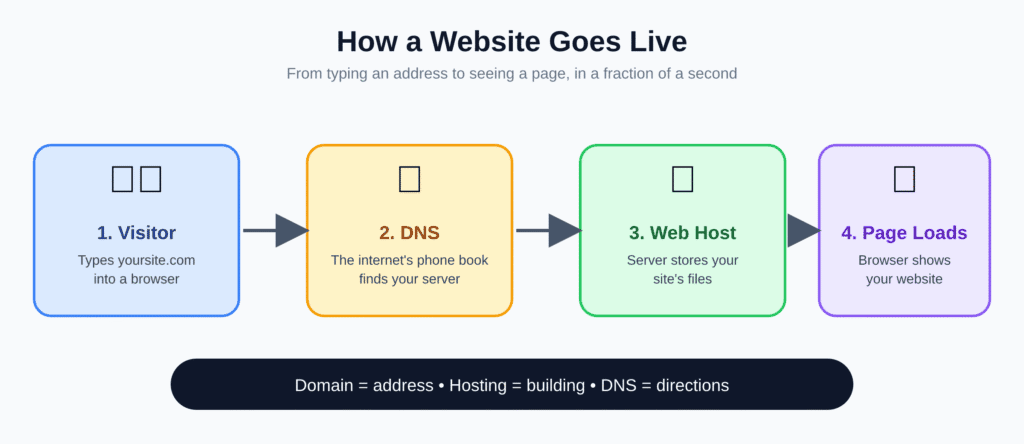
Before comparing providers, it helps to see the whole journey. Three pieces need to work together:
- A domain name, such as yourbusiness.com. This is the address people type into a browser.
- Web hosting, where your site’s files are stored and served.
- DNS (Domain Name System), the internet’s phone book. It connects your domain name to the server that holds your site.
When a visitor types your address into their browser, DNS looks up which server hosts your site, the browser requests your pages from that server, and the server sends them back. It all happens in a fraction of a second.
Point to note: you can buy your domain and hosting from the same company or from different ones. Buying together is simpler for beginners. Buying separately gives you more flexibility if you ever want to switch hosts.
The Main Types of Hosting
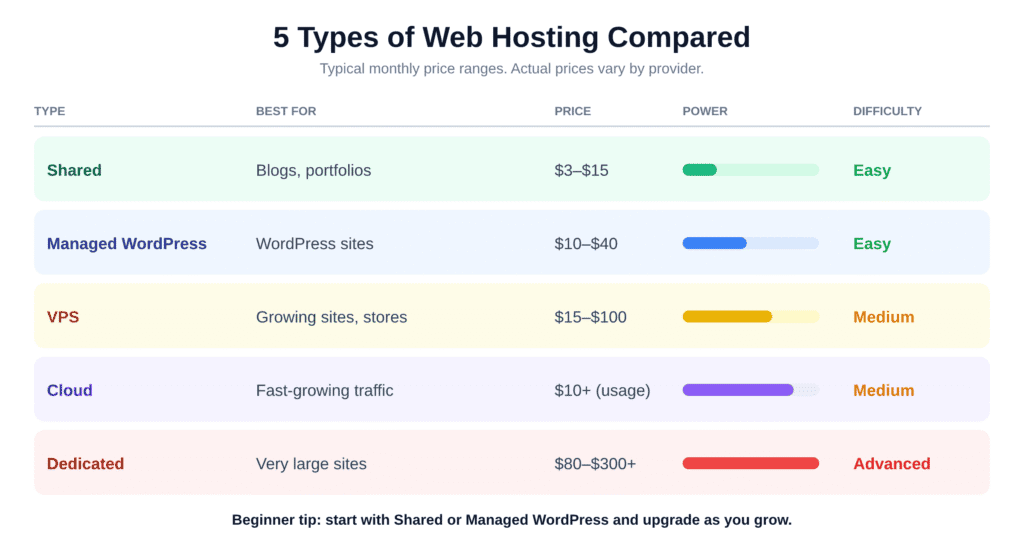
This is where most beginners get stuck, because providers offer a confusing menu of plans. In reality, there are five main types.
1. Shared Hosting
Your site shares a server, and its resources, with hundreds of other websites. It’s the cheapest option, often just a few dollars a month, and the provider handles all the technical maintenance.
Best for: personal sites, small blogs, portfolios, and new businesses with modest traffic. Downside: if a neighbouring site suddenly gets a traffic spike, your performance can dip.
2. Managed Hosting
This is hosting tuned specifically for WordPress, the platform that powers a huge share of the web. You typically get automatic updates, daily backups, built-in security, and expert support.
Best for: anyone building with WordPress who wants things to just work. Downside: it costs more than basic shared hosting and is limited to WordPress sites.
3. VPS (Virtual Private Server) Hosting
A VPS is a slice of a physical server reserved just for you. You get guaranteed resources and more control, but you (or your provider, on managed plans) must handle setup and maintenance.
Best for: growing sites, online shops, and developers who need custom software. Downside: it demands more technical skill unless you pay for a managed plan.
4. Cloud Hosting
Instead of relying on a single machine, cloud hosting spreads your site across a network of connected servers. If one has a problem, another takes over, and you can scale resources up or down as needed.
Best for: sites with unpredictable or fast-growing traffic. Downside: pricing can be harder to predict, since many plans are usage-based.
5. Dedicated Hosting
You rent an entire physical server. It offers maximum power, performance, and control, and it’s also the most expensive.
Best for: very large, high-traffic websites and applications. Downside: overkill (and costly) for beginners.
What About Website Builders?
Platforms like Wix, Squarespace, and Shopify bundle hosting, design tools, and support into one subscription. They’re extremely beginner-friendly, but you give up some flexibility and moving your site elsewhere later can be difficult. If you want full control and lower long-term costs, traditional hosting plus a tool like WordPress is usually the better route.
Our recommendation for most beginners: start with shared or managed WordPress hosting. You can always upgrade as your site grows, and every reputable provider makes upgrading straightforward.
What to Look For When Choosing a Host
With dozens of providers competing for your attention, it’s easy to be swayed by flashy discounts. Focus on these factors instead.
Reliability and Uptime
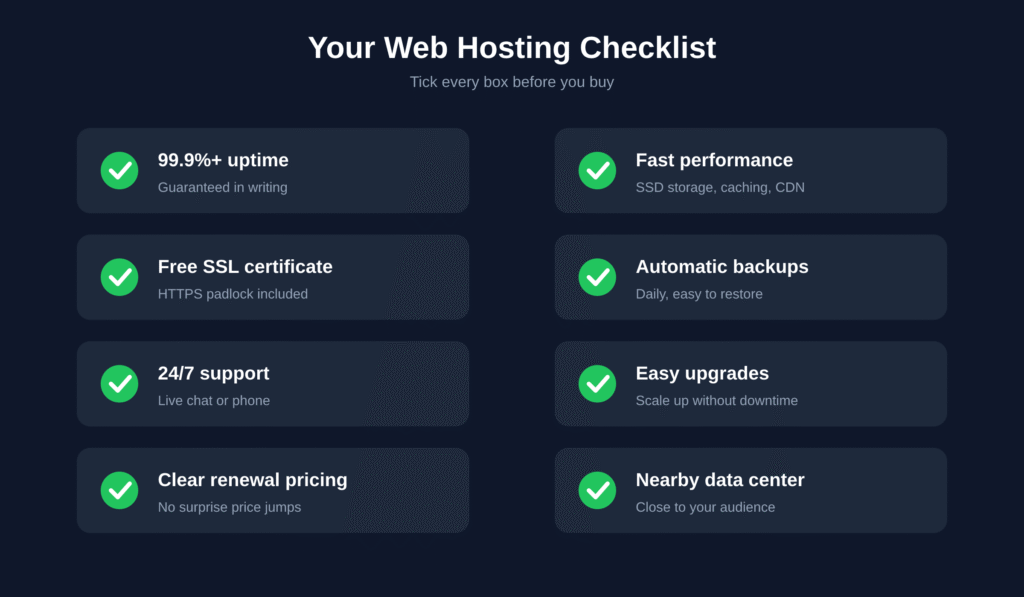
Uptime is the percentage of time your site is online. Look for a provider that guarantees at least 99.9% uptime. That might sound perfect, but the difference between 99% and 99.9% is the difference between roughly 3.5 days and under 9 hours of downtime per year.
Speed
Slow sites frustrate visitors and can hurt your search rankings. Look for providers that offer solid-state drives (SSDs), built-in caching, and a content delivery network (CDN), which serves your site from locations closer to your visitors.
Security Features
At a minimum your host should include a free SSL certificate (the padlock in the browser that enables HTTPS), regular malware scanning, firewall protection, and automatic backups. These are standard in 2026; don’t pay extra for them.
Customer Support
When something breaks at 2 a.m., you’ll want help fast. Check whether support is available 24/7 through live chat or phone, and read independent reviews to see how real customers rate it.
Scalability
Your needs will change. Make sure you can upgrade to a bigger plan without migrating your whole site or suffering downtime.
Ease of Use
A clean dashboard, one-click installers for tools like WordPress, and a user-friendly control panel make a huge difference when you’re learning.
Transparent Pricing
Many hosts advertise a very low introductory price that jumps significantly at renewal. Always check the renewal rate, the length of the contract, and what’s included. A good host is upfront about all three.
Data Center Location
Choose a server location close to your main audience. Closer servers mean faster load times.
How to Get Your Website Online: Step by Step
Ready to go? Here’s the whole process from start to finish.
Step 1: Define Your Website’s Purpose
Decide what your site is for: a blog, an online store, a portfolio, or a business page. This determines the features and resources you need.
Step 2: Choose and Register a Domain Name
Pick a name that’s short, memorable, and easy to spell. Stick with .com if you can, or choose a relevant alternative such as .org, .co, or a country extension. Avoid hyphens and numbers, which are easy to mishear and mistype. Many hosts include a free domain for the first year.
Step 3: Select a Hosting Provider and Plan
Using the checklist above, shortlist two or three providers and compare plans. Choose a plan you can comfortably afford at the renewal price, not just the promotional one.
Step 4: Connect Your Domain to Your Hosting
If you bought both from the same company, this usually happens automatically. If not, you’ll update your domain’s nameservers (provided by your host) in your domain registrar’s settings. Changes can take anywhere from a few minutes to 48 hours to spread across the internet. This is called DNS propagation, and it’s normal.
Step 5: Install Your Website Platform
Most hosts offer a one-click installer. Select WordPress (or your preferred platform), enter your site name and admin login, and click install. Within minutes you’ll have a working website.
Step 6: Enable SSL
Switch on your free SSL certificate from the hosting dashboard so your site loads securely over HTTPS. Browsers warn visitors away from sites without it.
Step 7: Build and Design Your Site
Choose a theme, create your core pages (Home, About, Contact, and any product or service pages), and add your content. Keep the design clean, mobile-friendly, and easy to navigate.
Step 8: Test Everything
Before announcing your launch, check your site on a phone, tablet, and computer. Click every link, test your contact form, and check your page speed with a free tool.
Step 9: Launch and Promote
Publish your site, submit it to Google Search Console so search engines can find it, and share it on your social channels.
Step 10: Set Up Backups and Maintenance
Confirm that automatic backups are running and keep your software, themes, and plugins updated. Regular maintenance is the cheapest insurance you can buy.
What Does Web Hosting Cost?
Prices vary widely by provider and change often, but here are typical ranges to help you budget:
- Shared hosting: roughly $3 to $15 per month
- Managed WordPress hosting: roughly $10 to $40 per month
- VPS hosting: roughly $15 to $100 per month
- Cloud hosting: from about $10 per month, rising with usage
- Dedicated hosting: roughly $80 to several hundred dollars per month
- Domain name: around $10 to $20 per year
Watch out for add-ons that may or may not be worth it, such as premium backups, extra security tools, and professional email. Start with the essentials and add extras only when you genuinely need them.
Common Beginner Mistakes to Avoid
- Choosing on price alone. The cheapest plan can cost you more in downtime, slow speeds, and poor support.
- Ignoring renewal rates. That bargain first-year price may double or triple later.
- Buying more than you need. You don’t need a dedicated server for a ten-page site.
- Skipping backups. If something goes wrong, a backup is the difference between a quick fix and starting over.
- Neglecting security. Use strong, unique passwords and turn on two-factor authentication for your hosting account.
- Forgetting about mobile. Most visitors will see your site on a phone, so test it there first.
Frequently Asked Questions
Do I need web hosting if I use a website builder? No. Builders like Wix and Squarespace include hosting in their subscription.
Can I switch hosts later? Yes. Most providers offer free or low-cost migration help, and plugins can move WordPress sites for you. It’s much easier if you own your domain separately.
How much traffic can shared hosting handle? Plenty for a new site, often tens of thousands of visits per month. If you outgrow it, upgrading is simple.
Is free hosting a good idea? Generally no. Free hosts often show ads, limit features, offer weak security, and rarely provide real support. They’re fine for experiments but not for a site you care about.
What’s the difference between a domain and hosting? Your domain is your site’s address; hosting is where its files live. You need both.
Do I need to know how to code? Not at all. Tools like WordPress and drag-and-drop builders let you create a professional site without writing code.
Final Thoughts
Getting a website online in 2026 doesn’t have to be intimidating. Understand the basics, choose a hosting type that matches your current needs, pick a reliable provider with transparent pricing, and follow the steps above. Most beginners can go from zero to a live website in a single afternoon.
Start small, focus on creating great content, and upgrade your hosting as your audience grows. The most important step is the first one, so pick your domain, choose your plan, and get your website out into the world.